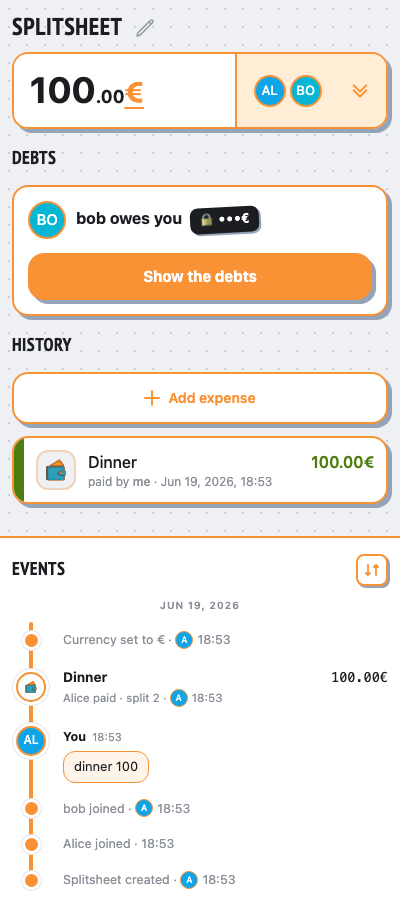
webapp: expense edit / remove / restore
restores a bare expense by re-sending its detected base currency, value-preserving
👥 People
Alice @aliceBob @bob
sendsAlice runs /newsplit @bob
👥 Group chat
Alice
/newsplit @bob
Hello! I’m @splitsheetbot, here to help you split bills with friends. — show full message
Hello! I’m @splitsheetbot, here to help you split bills with friends.
I use something called a Splitsheet—a dynamic message that keeps track of all expenses and debts. Below, you’ll find your first Splitsheet.
Here’s how to get started:
1. Join the Splitsheet by clicking the 👥➕ button (or reply with add @username)
2. Reply to the Splitsheet with a description of your expense
3. Pin the Splitsheet for quick access
Examples of messages:
- groceries 50 (sender paid, and the cost is split evenly among all members)
- bought coffee for Emma 15 (sender paid, and only Emma owes)
- John bought concert tickets for me and Sarah, 40 each (John spent 80, and both Sarah and you owe)
How to edit expenses:
- Edit your own message
- Reply to your message with the changes
- Reply to your message requesting deletion
Adding expenses is free. One payment shows who owes whom, for the whole group, forever.
When you're ready to start a new Splitsheet, use the /newsplit command. You can mention members to add them immediately: /newsplit @alice @bob
If you have any questions or suggestions, feel free to contact @splitsheet_help_bot
I use something called a Splitsheet—a dynamic message that keeps track of all expenses and debts. Below, you’ll find your first Splitsheet.
Here’s how to get started:
1. Join the Splitsheet by clicking the 👥➕ button (or reply with add @username)
2. Reply to the Splitsheet with a description of your expense
3. Pin the Splitsheet for quick access
Examples of messages:
- groceries 50 (sender paid, and the cost is split evenly among all members)
- bought coffee for Emma 15 (sender paid, and only Emma owes)
- John bought concert tickets for me and Sarah, 40 each (John spent 80, and both Sarah and you owe)
How to edit expenses:
- Edit your own message
- Reply to your message with the changes
- Reply to your message requesting deletion
Adding expenses is free. One payment shows who owes whom, for the whole group, forever.
When you're ready to start a new Splitsheet, use the /newsplit command. You can mention members to add them immediately: /newsplit @alice @bob
If you have any questions or suggestions, feel free to contact @splitsheet_help_bot
🌐
👤➕More ••• ↗
🛡️ Admin log channel
📋 #splitsheet_created
By: Alice
Sheet:
👤 #member_joined
Name: Alice
Sheet:
👤 #member_joined
Name: bob
Sheet:
By: Alice
Sheet:
9e6b3675-fc1a-45d7-902e-38ea5911141a👤 #member_joined
Name: Alice
Sheet:
9e6b3675-fc1a-45d7-902e-38ea5911141a👤 #member_joined
Name: bob
Sheet:
9e6b3675-fc1a-45d7-902e-38ea5911141arepliesAlice replies to the splitsheet: “dinner 100”
👥 Group chat
Alice
/newsplit @bob
Hello! I’m @splitsheetbot, here to help you split bills with friends. — show full message
Hello! I’m @splitsheetbot, here to help you split bills with friends.
I use something called a Splitsheet—a dynamic message that keeps track of all expenses and debts. Below, you’ll find your first Splitsheet.
Here’s how to get started:
1. Join the Splitsheet by clicking the 👥➕ button (or reply with add @username)
2. Reply to the Splitsheet with a description of your expense
3. Pin the Splitsheet for quick access
Examples of messages:
- groceries 50 (sender paid, and the cost is split evenly among all members)
- bought coffee for Emma 15 (sender paid, and only Emma owes)
- John bought concert tickets for me and Sarah, 40 each (John spent 80, and both Sarah and you owe)
How to edit expenses:
- Edit your own message
- Reply to your message with the changes
- Reply to your message requesting deletion
Adding expenses is free. One payment shows who owes whom, for the whole group, forever.
When you're ready to start a new Splitsheet, use the /newsplit command. You can mention members to add them immediately: /newsplit @alice @bob
If you have any questions or suggestions, feel free to contact @splitsheet_help_bot
I use something called a Splitsheet—a dynamic message that keeps track of all expenses and debts. Below, you’ll find your first Splitsheet.
Here’s how to get started:
1. Join the Splitsheet by clicking the 👥➕ button (or reply with add @username)
2. Reply to the Splitsheet with a description of your expense
3. Pin the Splitsheet for quick access
Examples of messages:
- groceries 50 (sender paid, and the cost is split evenly among all members)
- bought coffee for Emma 15 (sender paid, and only Emma owes)
- John bought concert tickets for me and Sarah, 40 each (John spent 80, and both Sarah and you owe)
How to edit expenses:
- Edit your own message
- Reply to your message with the changes
- Reply to your message requesting deletion
Adding expenses is free. One payment shows who owes whom, for the whole group, forever.
When you're ready to start a new Splitsheet, use the /newsplit command. You can mention members to add them immediately: /newsplit @alice @bob
If you have any questions or suggestions, feel free to contact @splitsheet_help_bot
🌐
📋 Splitsheet
💰 100.00 • 👥 Alice, @bob
Sep 21, 2026
Dinner ― 100.00 • Alice for all
🔒 All debts are already calculated. Unlock to see them
↩️ Reply to add an expense. Or tap here
💰 100.00 • 👥 Alice, @bob
Sep 21, 2026
Dinner ― 100.00 • Alice for all
🔒 All debts are already calculated. Unlock to see them
↩️ Reply to add an expense. Or tap here
👤➕More ••• ↗
🔓 See the debts
Alice
dinner 100
✍️
viaWebApp.setCurrencyAlice sets the base currency to EUR
👥 Group chat
Alice
/newsplit @bob
Hello! I’m @splitsheetbot, here to help you split bills with friends. — show full message
Hello! I’m @splitsheetbot, here to help you split bills with friends.
I use something called a Splitsheet—a dynamic message that keeps track of all expenses and debts. Below, you’ll find your first Splitsheet.
Here’s how to get started:
1. Join the Splitsheet by clicking the 👥➕ button (or reply with add @username)
2. Reply to the Splitsheet with a description of your expense
3. Pin the Splitsheet for quick access
Examples of messages:
- groceries 50 (sender paid, and the cost is split evenly among all members)
- bought coffee for Emma 15 (sender paid, and only Emma owes)
- John bought concert tickets for me and Sarah, 40 each (John spent 80, and both Sarah and you owe)
How to edit expenses:
- Edit your own message
- Reply to your message with the changes
- Reply to your message requesting deletion
Adding expenses is free. One payment shows who owes whom, for the whole group, forever.
When you're ready to start a new Splitsheet, use the /newsplit command. You can mention members to add them immediately: /newsplit @alice @bob
If you have any questions or suggestions, feel free to contact @splitsheet_help_bot
I use something called a Splitsheet—a dynamic message that keeps track of all expenses and debts. Below, you’ll find your first Splitsheet.
Here’s how to get started:
1. Join the Splitsheet by clicking the 👥➕ button (or reply with add @username)
2. Reply to the Splitsheet with a description of your expense
3. Pin the Splitsheet for quick access
Examples of messages:
- groceries 50 (sender paid, and the cost is split evenly among all members)
- bought coffee for Emma 15 (sender paid, and only Emma owes)
- John bought concert tickets for me and Sarah, 40 each (John spent 80, and both Sarah and you owe)
How to edit expenses:
- Edit your own message
- Reply to your message with the changes
- Reply to your message requesting deletion
Adding expenses is free. One payment shows who owes whom, for the whole group, forever.
When you're ready to start a new Splitsheet, use the /newsplit command. You can mention members to add them immediately: /newsplit @alice @bob
If you have any questions or suggestions, feel free to contact @splitsheet_help_bot
🌐
📋 Splitsheet
💰 100.00€ • 👥 Alice, @bob
Sep 21, 2026
Dinner ― 100.00€ • Alice for all
🔒 All debts are already calculated. Unlock to see them
↩️ Reply to add an expense. Or tap here
💰 100.00€ • 👥 Alice, @bob
Sep 21, 2026
Dinner ― 100.00€ • Alice for all
🔒 All debts are already calculated. Unlock to see them
↩️ Reply to add an expense. Or tap here
👤➕More ••• ↗
🔓 See the debts
Alice
dinner 100
✍️
📱 Mini App
viaWebApp.removeExpenseAlice removes the expense
👥 Group chat
Alice
/newsplit @bob
Hello! I’m @splitsheetbot, here to help you split bills with friends. — show full message
Hello! I’m @splitsheetbot, here to help you split bills with friends.
I use something called a Splitsheet—a dynamic message that keeps track of all expenses and debts. Below, you’ll find your first Splitsheet.
Here’s how to get started:
1. Join the Splitsheet by clicking the 👥➕ button (or reply with add @username)
2. Reply to the Splitsheet with a description of your expense
3. Pin the Splitsheet for quick access
Examples of messages:
- groceries 50 (sender paid, and the cost is split evenly among all members)
- bought coffee for Emma 15 (sender paid, and only Emma owes)
- John bought concert tickets for me and Sarah, 40 each (John spent 80, and both Sarah and you owe)
How to edit expenses:
- Edit your own message
- Reply to your message with the changes
- Reply to your message requesting deletion
Adding expenses is free. One payment shows who owes whom, for the whole group, forever.
When you're ready to start a new Splitsheet, use the /newsplit command. You can mention members to add them immediately: /newsplit @alice @bob
If you have any questions or suggestions, feel free to contact @splitsheet_help_bot
I use something called a Splitsheet—a dynamic message that keeps track of all expenses and debts. Below, you’ll find your first Splitsheet.
Here’s how to get started:
1. Join the Splitsheet by clicking the 👥➕ button (or reply with add @username)
2. Reply to the Splitsheet with a description of your expense
3. Pin the Splitsheet for quick access
Examples of messages:
- groceries 50 (sender paid, and the cost is split evenly among all members)
- bought coffee for Emma 15 (sender paid, and only Emma owes)
- John bought concert tickets for me and Sarah, 40 each (John spent 80, and both Sarah and you owe)
How to edit expenses:
- Edit your own message
- Reply to your message with the changes
- Reply to your message requesting deletion
Adding expenses is free. One payment shows who owes whom, for the whole group, forever.
When you're ready to start a new Splitsheet, use the /newsplit command. You can mention members to add them immediately: /newsplit @alice @bob
If you have any questions or suggestions, feel free to contact @splitsheet_help_bot
🌐
📋 Splitsheet
👥 Alice, @bob
Sep 21, 2026
Dinner ― 100.00€ • Alice for all
↩️ Reply to add an expense. Or tap here
👥 Alice, @bob
Sep 21, 2026
↩️ Reply to add an expense. Or tap here
👤➕More ••• ↗
Alice
dinner 100
✍️
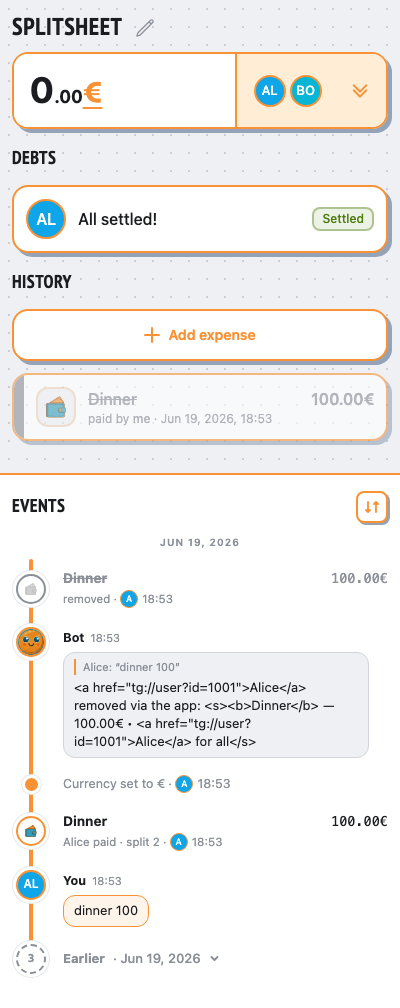
Alice removed via the app:
Dinner ― 100.00€ • Alice for all
📱 Mini App
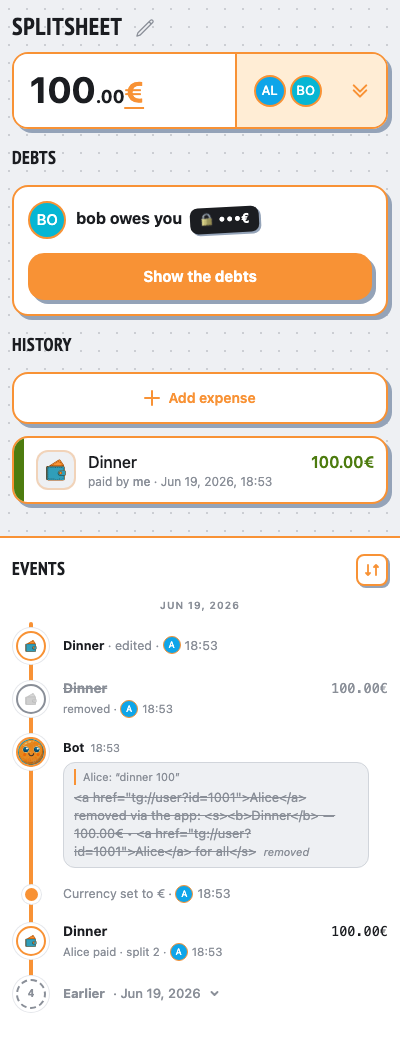
viaWebApp.saveExpenseAlice edits the expense (Dinner, 100)
- ✓the expense is live again
- ✓it reads as the base currency EUR
- ✓totals are unchanged (value-preserving restore)
- ✓the original 50 / -50 balance is restored
👥 Group chat
Alice
/newsplit @bob
Hello! I’m @splitsheetbot, here to help you split bills with friends. — show full message
Hello! I’m @splitsheetbot, here to help you split bills with friends.
I use something called a Splitsheet—a dynamic message that keeps track of all expenses and debts. Below, you’ll find your first Splitsheet.
Here’s how to get started:
1. Join the Splitsheet by clicking the 👥➕ button (or reply with add @username)
2. Reply to the Splitsheet with a description of your expense
3. Pin the Splitsheet for quick access
Examples of messages:
- groceries 50 (sender paid, and the cost is split evenly among all members)
- bought coffee for Emma 15 (sender paid, and only Emma owes)
- John bought concert tickets for me and Sarah, 40 each (John spent 80, and both Sarah and you owe)
How to edit expenses:
- Edit your own message
- Reply to your message with the changes
- Reply to your message requesting deletion
Adding expenses is free. One payment shows who owes whom, for the whole group, forever.
When you're ready to start a new Splitsheet, use the /newsplit command. You can mention members to add them immediately: /newsplit @alice @bob
If you have any questions or suggestions, feel free to contact @splitsheet_help_bot
I use something called a Splitsheet—a dynamic message that keeps track of all expenses and debts. Below, you’ll find your first Splitsheet.
Here’s how to get started:
1. Join the Splitsheet by clicking the 👥➕ button (or reply with add @username)
2. Reply to the Splitsheet with a description of your expense
3. Pin the Splitsheet for quick access
Examples of messages:
- groceries 50 (sender paid, and the cost is split evenly among all members)
- bought coffee for Emma 15 (sender paid, and only Emma owes)
- John bought concert tickets for me and Sarah, 40 each (John spent 80, and both Sarah and you owe)
How to edit expenses:
- Edit your own message
- Reply to your message with the changes
- Reply to your message requesting deletion
Adding expenses is free. One payment shows who owes whom, for the whole group, forever.
When you're ready to start a new Splitsheet, use the /newsplit command. You can mention members to add them immediately: /newsplit @alice @bob
If you have any questions or suggestions, feel free to contact @splitsheet_help_bot
🌐
📋 Splitsheet
💰 100.00€ • 👥 Alice, @bob
Sep 21, 2026
Dinner ― 100.00€ • Alice for all
🔒 All debts are already calculated. Unlock to see them
↩️ Reply to add an expense. Or tap here
💰 100.00€ • 👥 Alice, @bob
Sep 21, 2026
Dinner ― 100.00€ • Alice for all
🔒 All debts are already calculated. Unlock to see them
↩️ Reply to add an expense. Or tap here
👤➕More ••• ↗
🔓 See the debts
Alice
dinner 100
✍️
Alice removed via the app:
Dinner ― 100.00€ • Alice for all
deleted📱 Mini App
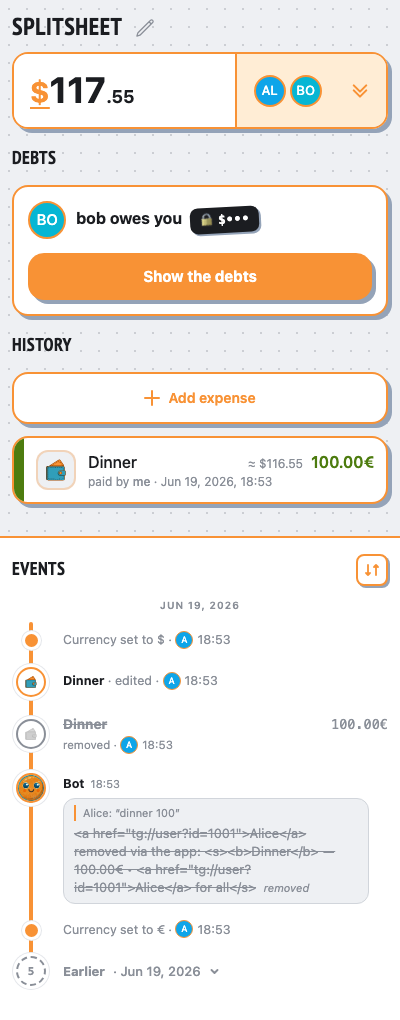
viaWebApp.setCurrencyAlice sets the base currency to USD
- ✓after base→USD the EUR expense converts (100 ÷ 0.858)
👥 Group chat
Alice
/newsplit @bob
Hello! I’m @splitsheetbot, here to help you split bills with friends. — show full message
Hello! I’m @splitsheetbot, here to help you split bills with friends.
I use something called a Splitsheet—a dynamic message that keeps track of all expenses and debts. Below, you’ll find your first Splitsheet.
Here’s how to get started:
1. Join the Splitsheet by clicking the 👥➕ button (or reply with add @username)
2. Reply to the Splitsheet with a description of your expense
3. Pin the Splitsheet for quick access
Examples of messages:
- groceries 50 (sender paid, and the cost is split evenly among all members)
- bought coffee for Emma 15 (sender paid, and only Emma owes)
- John bought concert tickets for me and Sarah, 40 each (John spent 80, and both Sarah and you owe)
How to edit expenses:
- Edit your own message
- Reply to your message with the changes
- Reply to your message requesting deletion
Adding expenses is free. One payment shows who owes whom, for the whole group, forever.
When you're ready to start a new Splitsheet, use the /newsplit command. You can mention members to add them immediately: /newsplit @alice @bob
If you have any questions or suggestions, feel free to contact @splitsheet_help_bot
I use something called a Splitsheet—a dynamic message that keeps track of all expenses and debts. Below, you’ll find your first Splitsheet.
Here’s how to get started:
1. Join the Splitsheet by clicking the 👥➕ button (or reply with add @username)
2. Reply to the Splitsheet with a description of your expense
3. Pin the Splitsheet for quick access
Examples of messages:
- groceries 50 (sender paid, and the cost is split evenly among all members)
- bought coffee for Emma 15 (sender paid, and only Emma owes)
- John bought concert tickets for me and Sarah, 40 each (John spent 80, and both Sarah and you owe)
How to edit expenses:
- Edit your own message
- Reply to your message with the changes
- Reply to your message requesting deletion
Adding expenses is free. One payment shows who owes whom, for the whole group, forever.
When you're ready to start a new Splitsheet, use the /newsplit command. You can mention members to add them immediately: /newsplit @alice @bob
If you have any questions or suggestions, feel free to contact @splitsheet_help_bot
🌐
📋 Splitsheet
💰 $116.55 • 👥 Alice, @bob
Sep 21, 2026
Dinner ― 100.00€ (≈$116.55) • Alice for all
🔒 All debts are already calculated. Unlock to see them
↩️ Reply to add an expense. Or tap here
💰 $116.55 • 👥 Alice, @bob
Sep 21, 2026
Dinner ― 100.00€ (≈$116.55) • Alice for all
🔒 All debts are already calculated. Unlock to see them
↩️ Reply to add an expense. Or tap here
👤➕More ••• ↗
🔓 See the debts
Alice
dinner 100
✍️
Alice removed via the app:
Dinner ― 100.00€ • Alice for all
deleted📱 Mini App