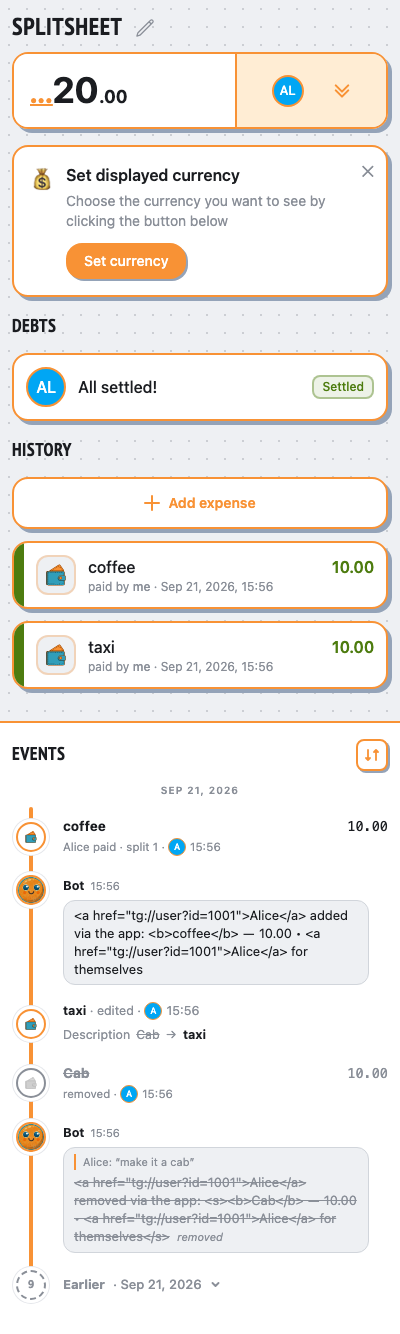
forum topics
routes Mini App add/edit/remove/restore announcements to the saved topic
👥 People
Alice @alice
sendsAlice runs /newsplit
👥 Group chat
Alice
/newsplit
Hello! I’m @splitsheetbot, here to help you split bills with friends. — show full message
Hello! I’m @splitsheetbot, here to help you split bills with friends.
I use something called a Splitsheet—a dynamic message that keeps track of all expenses and debts. Below, you’ll find your first Splitsheet.
Here’s how to get started:
1. Join the Splitsheet by clicking the 👥➕ button (or reply with add @username)
2. Reply to the Splitsheet with a description of your expense
3. Pin the Splitsheet for quick access
Examples of messages:
- groceries 50 (sender paid, and the cost is split evenly among all members)
- bought coffee for Emma 15 (sender paid, and only Emma owes)
- John bought concert tickets for me and Sarah, 40 each (John spent 80, and both Sarah and you owe)
How to edit expenses:
- Edit your own message
- Reply to your message with the changes
- Reply to your message requesting deletion
Adding expenses is free. One payment shows who owes whom, for the whole group, forever.
When you're ready to start a new Splitsheet, use the /newsplit command. You can mention members to add them immediately: /newsplit @alice @bob
If you have any questions or suggestions, feel free to contact @splitsheet_help_bot
Want to use the bot in a separate topic? Open that topic and send /newsplit to create a splitsheet there.
I use something called a Splitsheet—a dynamic message that keeps track of all expenses and debts. Below, you’ll find your first Splitsheet.
Here’s how to get started:
1. Join the Splitsheet by clicking the 👥➕ button (or reply with add @username)
2. Reply to the Splitsheet with a description of your expense
3. Pin the Splitsheet for quick access
Examples of messages:
- groceries 50 (sender paid, and the cost is split evenly among all members)
- bought coffee for Emma 15 (sender paid, and only Emma owes)
- John bought concert tickets for me and Sarah, 40 each (John spent 80, and both Sarah and you owe)
How to edit expenses:
- Edit your own message
- Reply to your message with the changes
- Reply to your message requesting deletion
Adding expenses is free. One payment shows who owes whom, for the whole group, forever.
When you're ready to start a new Splitsheet, use the /newsplit command. You can mention members to add them immediately: /newsplit @alice @bob
If you have any questions or suggestions, feel free to contact @splitsheet_help_bot
Want to use the bot in a separate topic? Open that topic and send /newsplit to create a splitsheet there.
🌐
👤➕More ••• ↗
🛡️ Admin log channel
📋 #splitsheet_created
By: Alice
Sheet:
👤 #member_joined
Name: Alice
Sheet:
By: Alice
Sheet:
dcae151e-201b-48f3-a19f-8a7fcc032533👤 #member_joined
Name: Alice
Sheet:
dcae151e-201b-48f3-a19f-8a7fcc032533viaWebApp.addExpenseAlice adds an expense (taxi, 10)
👥 Group chat
Alice
/newsplit
Hello! I’m @splitsheetbot, here to help you split bills with friends. — show full message
Hello! I’m @splitsheetbot, here to help you split bills with friends.
I use something called a Splitsheet—a dynamic message that keeps track of all expenses and debts. Below, you’ll find your first Splitsheet.
Here’s how to get started:
1. Join the Splitsheet by clicking the 👥➕ button (or reply with add @username)
2. Reply to the Splitsheet with a description of your expense
3. Pin the Splitsheet for quick access
Examples of messages:
- groceries 50 (sender paid, and the cost is split evenly among all members)
- bought coffee for Emma 15 (sender paid, and only Emma owes)
- John bought concert tickets for me and Sarah, 40 each (John spent 80, and both Sarah and you owe)
How to edit expenses:
- Edit your own message
- Reply to your message with the changes
- Reply to your message requesting deletion
Adding expenses is free. One payment shows who owes whom, for the whole group, forever.
When you're ready to start a new Splitsheet, use the /newsplit command. You can mention members to add them immediately: /newsplit @alice @bob
If you have any questions or suggestions, feel free to contact @splitsheet_help_bot
Want to use the bot in a separate topic? Open that topic and send /newsplit to create a splitsheet there.
I use something called a Splitsheet—a dynamic message that keeps track of all expenses and debts. Below, you’ll find your first Splitsheet.
Here’s how to get started:
1. Join the Splitsheet by clicking the 👥➕ button (or reply with add @username)
2. Reply to the Splitsheet with a description of your expense
3. Pin the Splitsheet for quick access
Examples of messages:
- groceries 50 (sender paid, and the cost is split evenly among all members)
- bought coffee for Emma 15 (sender paid, and only Emma owes)
- John bought concert tickets for me and Sarah, 40 each (John spent 80, and both Sarah and you owe)
How to edit expenses:
- Edit your own message
- Reply to your message with the changes
- Reply to your message requesting deletion
Adding expenses is free. One payment shows who owes whom, for the whole group, forever.
When you're ready to start a new Splitsheet, use the /newsplit command. You can mention members to add them immediately: /newsplit @alice @bob
If you have any questions or suggestions, feel free to contact @splitsheet_help_bot
Want to use the bot in a separate topic? Open that topic and send /newsplit to create a splitsheet there.
🌐
📋 Splitsheet
💰 10.00 • 👥 Alice
Sep 21, 2026
taxi ― 10.00 • Alice for themselves
↩️ Reply to add an expense. Or tap here
💰 10.00 • 👥 Alice
Sep 21, 2026
taxi ― 10.00 • Alice for themselves
↩️ Reply to add an expense. Or tap here
👤➕More ••• ↗
Alice added via the app:
taxi ― 10.00 • Alice for themselves
taxi ― 10.00 • Alice for themselves
📱 Mini App
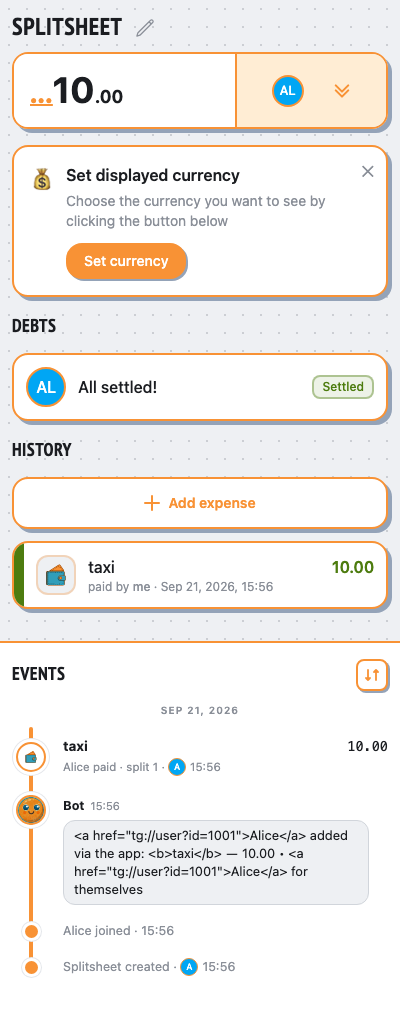
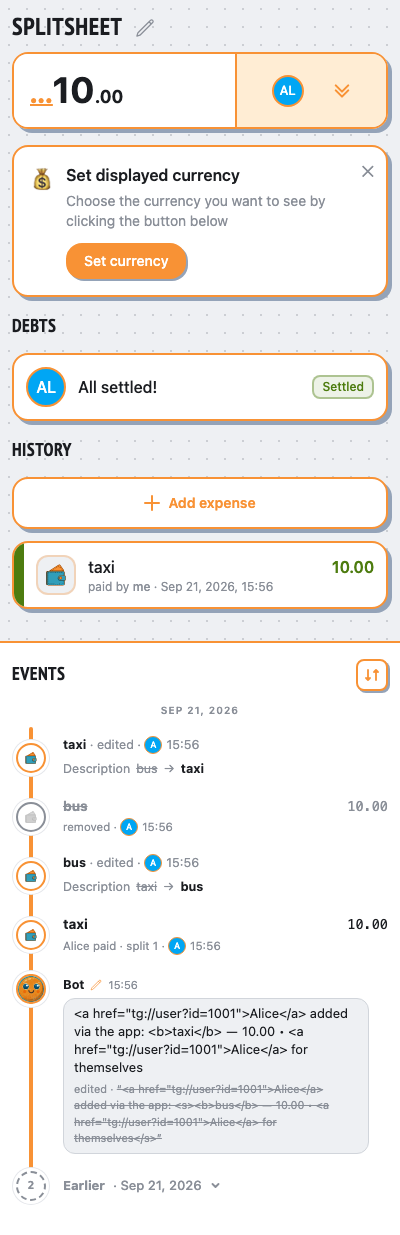
viaWebApp.saveExpenseAlice edits the expense (bus, 10)
- ✓the Mini App edit updates the announcement in its topic
👥 Group chat
Alice
/newsplit
Hello! I’m @splitsheetbot, here to help you split bills with friends. — show full message
Hello! I’m @splitsheetbot, here to help you split bills with friends.
I use something called a Splitsheet—a dynamic message that keeps track of all expenses and debts. Below, you’ll find your first Splitsheet.
Here’s how to get started:
1. Join the Splitsheet by clicking the 👥➕ button (or reply with add @username)
2. Reply to the Splitsheet with a description of your expense
3. Pin the Splitsheet for quick access
Examples of messages:
- groceries 50 (sender paid, and the cost is split evenly among all members)
- bought coffee for Emma 15 (sender paid, and only Emma owes)
- John bought concert tickets for me and Sarah, 40 each (John spent 80, and both Sarah and you owe)
How to edit expenses:
- Edit your own message
- Reply to your message with the changes
- Reply to your message requesting deletion
Adding expenses is free. One payment shows who owes whom, for the whole group, forever.
When you're ready to start a new Splitsheet, use the /newsplit command. You can mention members to add them immediately: /newsplit @alice @bob
If you have any questions or suggestions, feel free to contact @splitsheet_help_bot
Want to use the bot in a separate topic? Open that topic and send /newsplit to create a splitsheet there.
I use something called a Splitsheet—a dynamic message that keeps track of all expenses and debts. Below, you’ll find your first Splitsheet.
Here’s how to get started:
1. Join the Splitsheet by clicking the 👥➕ button (or reply with add @username)
2. Reply to the Splitsheet with a description of your expense
3. Pin the Splitsheet for quick access
Examples of messages:
- groceries 50 (sender paid, and the cost is split evenly among all members)
- bought coffee for Emma 15 (sender paid, and only Emma owes)
- John bought concert tickets for me and Sarah, 40 each (John spent 80, and both Sarah and you owe)
How to edit expenses:
- Edit your own message
- Reply to your message with the changes
- Reply to your message requesting deletion
Adding expenses is free. One payment shows who owes whom, for the whole group, forever.
When you're ready to start a new Splitsheet, use the /newsplit command. You can mention members to add them immediately: /newsplit @alice @bob
If you have any questions or suggestions, feel free to contact @splitsheet_help_bot
Want to use the bot in a separate topic? Open that topic and send /newsplit to create a splitsheet there.
🌐
📋 Splitsheet
💰 10.00 • 👥 Alice
Sep 21, 2026
bus ― 10.00 • Alice for themselves
↩️ Reply to add an expense. Or tap here
💰 10.00 • 👥 Alice
Sep 21, 2026
bus ― 10.00 • Alice for themselves
↩️ Reply to add an expense. Or tap here
👤➕More ••• ↗
Alice added via the app:
bus ― 10.00 • Alice for themselves
bus ― 10.00 • Alice for themselves
📱 Mini App
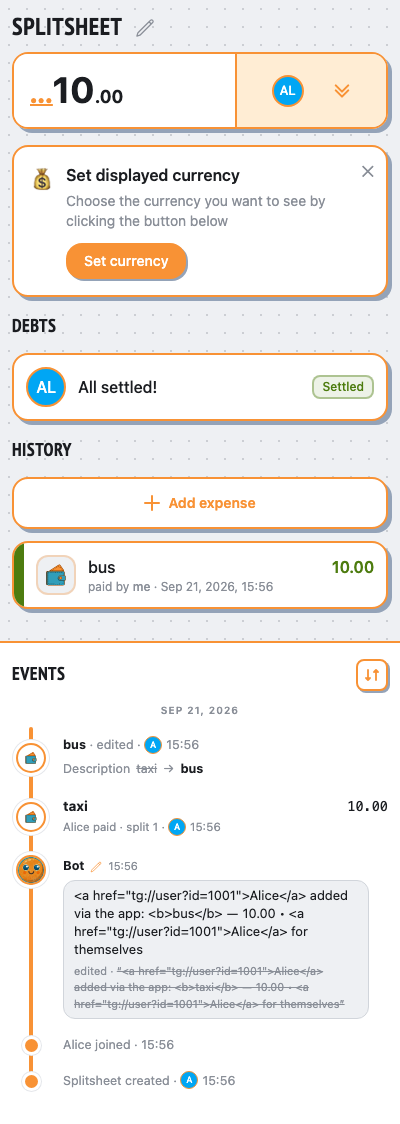
viaWebApp.removeExpenseAlice removes the expense
👥 Group chat
Alice
/newsplit
Hello! I’m @splitsheetbot, here to help you split bills with friends. — show full message
Hello! I’m @splitsheetbot, here to help you split bills with friends.
I use something called a Splitsheet—a dynamic message that keeps track of all expenses and debts. Below, you’ll find your first Splitsheet.
Here’s how to get started:
1. Join the Splitsheet by clicking the 👥➕ button (or reply with add @username)
2. Reply to the Splitsheet with a description of your expense
3. Pin the Splitsheet for quick access
Examples of messages:
- groceries 50 (sender paid, and the cost is split evenly among all members)
- bought coffee for Emma 15 (sender paid, and only Emma owes)
- John bought concert tickets for me and Sarah, 40 each (John spent 80, and both Sarah and you owe)
How to edit expenses:
- Edit your own message
- Reply to your message with the changes
- Reply to your message requesting deletion
Adding expenses is free. One payment shows who owes whom, for the whole group, forever.
When you're ready to start a new Splitsheet, use the /newsplit command. You can mention members to add them immediately: /newsplit @alice @bob
If you have any questions or suggestions, feel free to contact @splitsheet_help_bot
Want to use the bot in a separate topic? Open that topic and send /newsplit to create a splitsheet there.
I use something called a Splitsheet—a dynamic message that keeps track of all expenses and debts. Below, you’ll find your first Splitsheet.
Here’s how to get started:
1. Join the Splitsheet by clicking the 👥➕ button (or reply with add @username)
2. Reply to the Splitsheet with a description of your expense
3. Pin the Splitsheet for quick access
Examples of messages:
- groceries 50 (sender paid, and the cost is split evenly among all members)
- bought coffee for Emma 15 (sender paid, and only Emma owes)
- John bought concert tickets for me and Sarah, 40 each (John spent 80, and both Sarah and you owe)
How to edit expenses:
- Edit your own message
- Reply to your message with the changes
- Reply to your message requesting deletion
Adding expenses is free. One payment shows who owes whom, for the whole group, forever.
When you're ready to start a new Splitsheet, use the /newsplit command. You can mention members to add them immediately: /newsplit @alice @bob
If you have any questions or suggestions, feel free to contact @splitsheet_help_bot
Want to use the bot in a separate topic? Open that topic and send /newsplit to create a splitsheet there.
🌐
📋 Splitsheet
👥 Alice
Sep 21, 2026
bus ― 10.00 • Alice for themselves
↩️ Reply to add an expense. Or tap here
👥 Alice
Sep 21, 2026
↩️ Reply to add an expense. Or tap here
👤➕More ••• ↗
Alice added via the app:
bus ― 10.00 • Alice for themselves
📱 Mini App
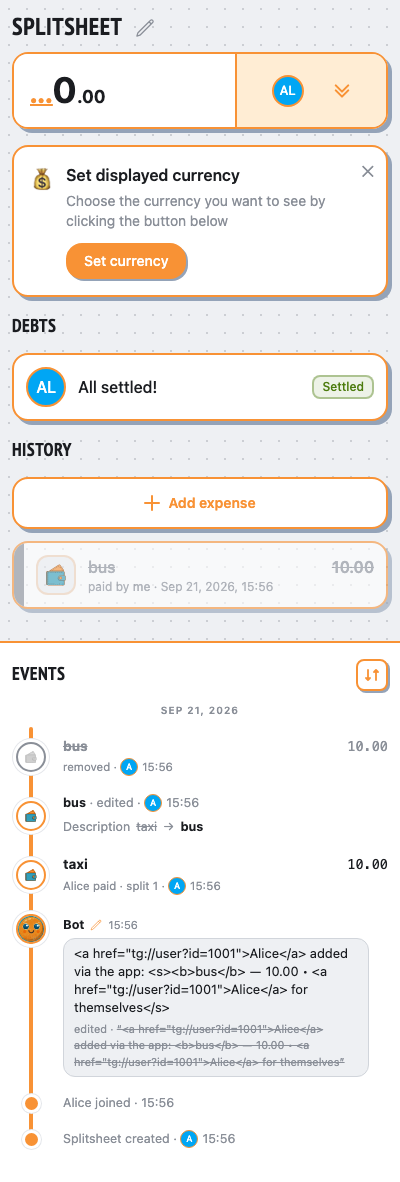
viaWebApp.saveExpenseAlice edits the expense (taxi, 10)
- ✓remove and restore keep the announcement in its topic
👥 Group chat
Alice
/newsplit
Hello! I’m @splitsheetbot, here to help you split bills with friends. — show full message
Hello! I’m @splitsheetbot, here to help you split bills with friends.
I use something called a Splitsheet—a dynamic message that keeps track of all expenses and debts. Below, you’ll find your first Splitsheet.
Here’s how to get started:
1. Join the Splitsheet by clicking the 👥➕ button (or reply with add @username)
2. Reply to the Splitsheet with a description of your expense
3. Pin the Splitsheet for quick access
Examples of messages:
- groceries 50 (sender paid, and the cost is split evenly among all members)
- bought coffee for Emma 15 (sender paid, and only Emma owes)
- John bought concert tickets for me and Sarah, 40 each (John spent 80, and both Sarah and you owe)
How to edit expenses:
- Edit your own message
- Reply to your message with the changes
- Reply to your message requesting deletion
Adding expenses is free. One payment shows who owes whom, for the whole group, forever.
When you're ready to start a new Splitsheet, use the /newsplit command. You can mention members to add them immediately: /newsplit @alice @bob
If you have any questions or suggestions, feel free to contact @splitsheet_help_bot
Want to use the bot in a separate topic? Open that topic and send /newsplit to create a splitsheet there.
I use something called a Splitsheet—a dynamic message that keeps track of all expenses and debts. Below, you’ll find your first Splitsheet.
Here’s how to get started:
1. Join the Splitsheet by clicking the 👥➕ button (or reply with add @username)
2. Reply to the Splitsheet with a description of your expense
3. Pin the Splitsheet for quick access
Examples of messages:
- groceries 50 (sender paid, and the cost is split evenly among all members)
- bought coffee for Emma 15 (sender paid, and only Emma owes)
- John bought concert tickets for me and Sarah, 40 each (John spent 80, and both Sarah and you owe)
How to edit expenses:
- Edit your own message
- Reply to your message with the changes
- Reply to your message requesting deletion
Adding expenses is free. One payment shows who owes whom, for the whole group, forever.
When you're ready to start a new Splitsheet, use the /newsplit command. You can mention members to add them immediately: /newsplit @alice @bob
If you have any questions or suggestions, feel free to contact @splitsheet_help_bot
Want to use the bot in a separate topic? Open that topic and send /newsplit to create a splitsheet there.
🌐
📋 Splitsheet
💰 10.00 • 👥 Alice
Sep 21, 2026
taxi ― 10.00 • Alice for themselves
↩️ Reply to add an expense. Or tap here
💰 10.00 • 👥 Alice
Sep 21, 2026
taxi ― 10.00 • Alice for themselves
↩️ Reply to add an expense. Or tap here
👤➕More ••• ↗
Alice added via the app:
taxi ― 10.00 • Alice for themselves
taxi ― 10.00 • Alice for themselves
📱 Mini App
repliesAlice replies to a message: “make it a cab”
👥 Group chat
Alice
/newsplit
Hello! I’m @splitsheetbot, here to help you split bills with friends. — show full message
Hello! I’m @splitsheetbot, here to help you split bills with friends.
I use something called a Splitsheet—a dynamic message that keeps track of all expenses and debts. Below, you’ll find your first Splitsheet.
Here’s how to get started:
1. Join the Splitsheet by clicking the 👥➕ button (or reply with add @username)
2. Reply to the Splitsheet with a description of your expense
3. Pin the Splitsheet for quick access
Examples of messages:
- groceries 50 (sender paid, and the cost is split evenly among all members)
- bought coffee for Emma 15 (sender paid, and only Emma owes)
- John bought concert tickets for me and Sarah, 40 each (John spent 80, and both Sarah and you owe)
How to edit expenses:
- Edit your own message
- Reply to your message with the changes
- Reply to your message requesting deletion
Adding expenses is free. One payment shows who owes whom, for the whole group, forever.
When you're ready to start a new Splitsheet, use the /newsplit command. You can mention members to add them immediately: /newsplit @alice @bob
If you have any questions or suggestions, feel free to contact @splitsheet_help_bot
Want to use the bot in a separate topic? Open that topic and send /newsplit to create a splitsheet there.
I use something called a Splitsheet—a dynamic message that keeps track of all expenses and debts. Below, you’ll find your first Splitsheet.
Here’s how to get started:
1. Join the Splitsheet by clicking the 👥➕ button (or reply with add @username)
2. Reply to the Splitsheet with a description of your expense
3. Pin the Splitsheet for quick access
Examples of messages:
- groceries 50 (sender paid, and the cost is split evenly among all members)
- bought coffee for Emma 15 (sender paid, and only Emma owes)
- John bought concert tickets for me and Sarah, 40 each (John spent 80, and both Sarah and you owe)
How to edit expenses:
- Edit your own message
- Reply to your message with the changes
- Reply to your message requesting deletion
Adding expenses is free. One payment shows who owes whom, for the whole group, forever.
When you're ready to start a new Splitsheet, use the /newsplit command. You can mention members to add them immediately: /newsplit @alice @bob
If you have any questions or suggestions, feel free to contact @splitsheet_help_bot
Want to use the bot in a separate topic? Open that topic and send /newsplit to create a splitsheet there.
🌐
📋 Splitsheet
💰 10.00 • 👥 Alice
Sep 21, 2026
Cab ― 10.00 • Alice for themselves
↩️ Reply to add an expense. Or tap here
💰 10.00 • 👥 Alice
Sep 21, 2026
Cab ― 10.00 • Alice for themselves
↩️ Reply to add an expense. Or tap here
👤➕More ••• ↗
Alice added via the app:
taxi ― 10.00 • Alice for themselves
taxi ― 10.00 • Alice for themselves
Alice
make it a cab
✍️
viaWebApp.removeExpenseAlice removes the expense
- ✓a webapp removal after a user reply posts a new reply in the topic
👥 Group chat
Alice
/newsplit
Hello! I’m @splitsheetbot, here to help you split bills with friends. — show full message
Hello! I’m @splitsheetbot, here to help you split bills with friends.
I use something called a Splitsheet—a dynamic message that keeps track of all expenses and debts. Below, you’ll find your first Splitsheet.
Here’s how to get started:
1. Join the Splitsheet by clicking the 👥➕ button (or reply with add @username)
2. Reply to the Splitsheet with a description of your expense
3. Pin the Splitsheet for quick access
Examples of messages:
- groceries 50 (sender paid, and the cost is split evenly among all members)
- bought coffee for Emma 15 (sender paid, and only Emma owes)
- John bought concert tickets for me and Sarah, 40 each (John spent 80, and both Sarah and you owe)
How to edit expenses:
- Edit your own message
- Reply to your message with the changes
- Reply to your message requesting deletion
Adding expenses is free. One payment shows who owes whom, for the whole group, forever.
When you're ready to start a new Splitsheet, use the /newsplit command. You can mention members to add them immediately: /newsplit @alice @bob
If you have any questions or suggestions, feel free to contact @splitsheet_help_bot
Want to use the bot in a separate topic? Open that topic and send /newsplit to create a splitsheet there.
I use something called a Splitsheet—a dynamic message that keeps track of all expenses and debts. Below, you’ll find your first Splitsheet.
Here’s how to get started:
1. Join the Splitsheet by clicking the 👥➕ button (or reply with add @username)
2. Reply to the Splitsheet with a description of your expense
3. Pin the Splitsheet for quick access
Examples of messages:
- groceries 50 (sender paid, and the cost is split evenly among all members)
- bought coffee for Emma 15 (sender paid, and only Emma owes)
- John bought concert tickets for me and Sarah, 40 each (John spent 80, and both Sarah and you owe)
How to edit expenses:
- Edit your own message
- Reply to your message with the changes
- Reply to your message requesting deletion
Adding expenses is free. One payment shows who owes whom, for the whole group, forever.
When you're ready to start a new Splitsheet, use the /newsplit command. You can mention members to add them immediately: /newsplit @alice @bob
If you have any questions or suggestions, feel free to contact @splitsheet_help_bot
Want to use the bot in a separate topic? Open that topic and send /newsplit to create a splitsheet there.
🌐
📋 Splitsheet
👥 Alice
Sep 21, 2026
Cab ― 10.00 • Alice for themselves
↩️ Reply to add an expense. Or tap here
👥 Alice
Sep 21, 2026
↩️ Reply to add an expense. Or tap here
👤➕More ••• ↗
Alice added via the app:
taxi ― 10.00 • Alice for themselves
taxi ― 10.00 • Alice for themselves
Alice
make it a cab
✍️
Alice removed via the app:
Cab ― 10.00 • Alice for themselves
📱 Mini App
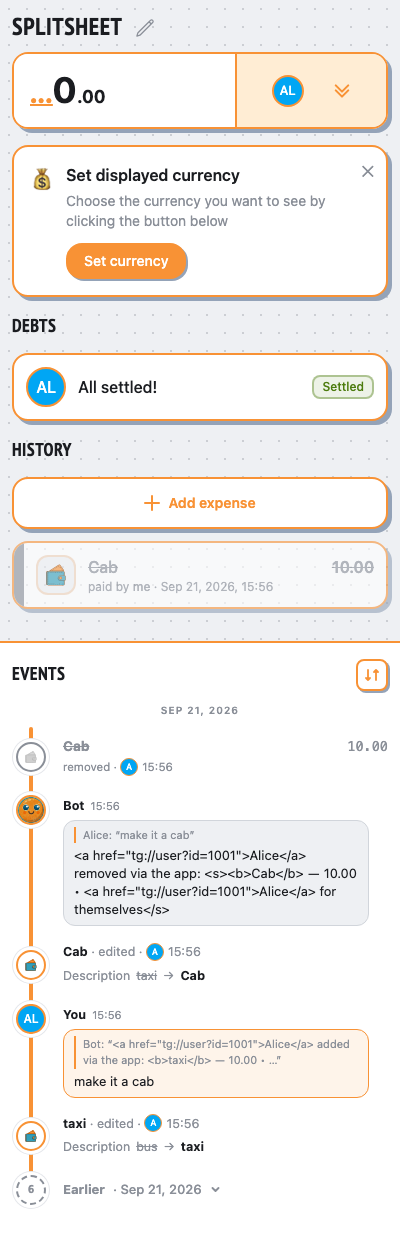
viaWebApp.saveExpenseAlice edits the expense (taxi, 10)
- ✓undo removes the topic removal announcement
👥 Group chat
Alice
/newsplit
Hello! I’m @splitsheetbot, here to help you split bills with friends. — show full message
Hello! I’m @splitsheetbot, here to help you split bills with friends.
I use something called a Splitsheet—a dynamic message that keeps track of all expenses and debts. Below, you’ll find your first Splitsheet.
Here’s how to get started:
1. Join the Splitsheet by clicking the 👥➕ button (or reply with add @username)
2. Reply to the Splitsheet with a description of your expense
3. Pin the Splitsheet for quick access
Examples of messages:
- groceries 50 (sender paid, and the cost is split evenly among all members)
- bought coffee for Emma 15 (sender paid, and only Emma owes)
- John bought concert tickets for me and Sarah, 40 each (John spent 80, and both Sarah and you owe)
How to edit expenses:
- Edit your own message
- Reply to your message with the changes
- Reply to your message requesting deletion
Adding expenses is free. One payment shows who owes whom, for the whole group, forever.
When you're ready to start a new Splitsheet, use the /newsplit command. You can mention members to add them immediately: /newsplit @alice @bob
If you have any questions or suggestions, feel free to contact @splitsheet_help_bot
Want to use the bot in a separate topic? Open that topic and send /newsplit to create a splitsheet there.
I use something called a Splitsheet—a dynamic message that keeps track of all expenses and debts. Below, you’ll find your first Splitsheet.
Here’s how to get started:
1. Join the Splitsheet by clicking the 👥➕ button (or reply with add @username)
2. Reply to the Splitsheet with a description of your expense
3. Pin the Splitsheet for quick access
Examples of messages:
- groceries 50 (sender paid, and the cost is split evenly among all members)
- bought coffee for Emma 15 (sender paid, and only Emma owes)
- John bought concert tickets for me and Sarah, 40 each (John spent 80, and both Sarah and you owe)
How to edit expenses:
- Edit your own message
- Reply to your message with the changes
- Reply to your message requesting deletion
Adding expenses is free. One payment shows who owes whom, for the whole group, forever.
When you're ready to start a new Splitsheet, use the /newsplit command. You can mention members to add them immediately: /newsplit @alice @bob
If you have any questions or suggestions, feel free to contact @splitsheet_help_bot
Want to use the bot in a separate topic? Open that topic and send /newsplit to create a splitsheet there.
🌐
📋 Splitsheet
💰 10.00 • 👥 Alice
Sep 21, 2026
taxi ― 10.00 • Alice for themselves
↩️ Reply to add an expense. Or tap here
💰 10.00 • 👥 Alice
Sep 21, 2026
taxi ― 10.00 • Alice for themselves
↩️ Reply to add an expense. Or tap here
👤➕More ••• ↗
Alice added via the app:
taxi ― 10.00 • Alice for themselves
taxi ― 10.00 • Alice for themselves
Alice
make it a cab
✍️
Alice removed via the app:
Cab ― 10.00 • Alice for themselves
deleted📱 Mini App
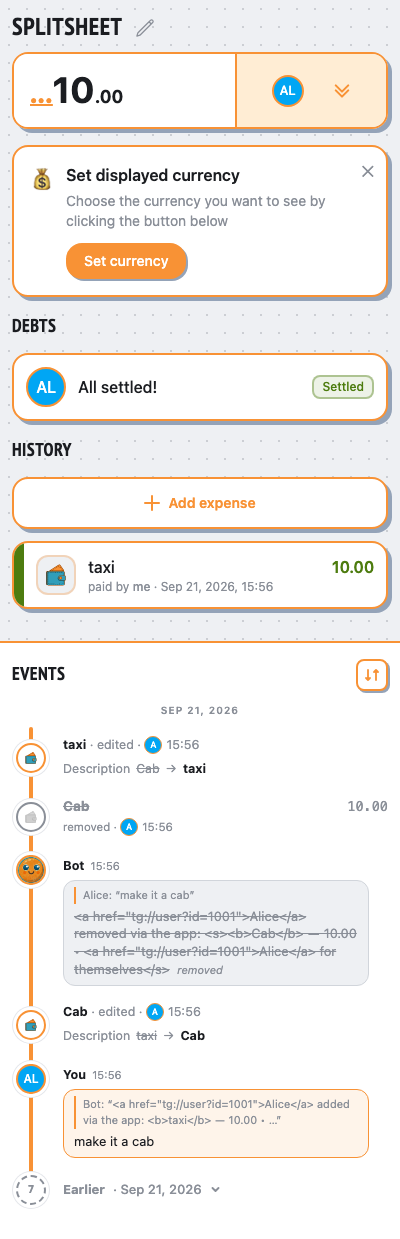
giventhe sheet message is unavailable, but its topic is still known
👥 Group chat
Alice
/newsplit
Hello! I’m @splitsheetbot, here to help you split bills with friends. — show full message
Hello! I’m @splitsheetbot, here to help you split bills with friends.
I use something called a Splitsheet—a dynamic message that keeps track of all expenses and debts. Below, you’ll find your first Splitsheet.
Here’s how to get started:
1. Join the Splitsheet by clicking the 👥➕ button (or reply with add @username)
2. Reply to the Splitsheet with a description of your expense
3. Pin the Splitsheet for quick access
Examples of messages:
- groceries 50 (sender paid, and the cost is split evenly among all members)
- bought coffee for Emma 15 (sender paid, and only Emma owes)
- John bought concert tickets for me and Sarah, 40 each (John spent 80, and both Sarah and you owe)
How to edit expenses:
- Edit your own message
- Reply to your message with the changes
- Reply to your message requesting deletion
Adding expenses is free. One payment shows who owes whom, for the whole group, forever.
When you're ready to start a new Splitsheet, use the /newsplit command. You can mention members to add them immediately: /newsplit @alice @bob
If you have any questions or suggestions, feel free to contact @splitsheet_help_bot
Want to use the bot in a separate topic? Open that topic and send /newsplit to create a splitsheet there.
I use something called a Splitsheet—a dynamic message that keeps track of all expenses and debts. Below, you’ll find your first Splitsheet.
Here’s how to get started:
1. Join the Splitsheet by clicking the 👥➕ button (or reply with add @username)
2. Reply to the Splitsheet with a description of your expense
3. Pin the Splitsheet for quick access
Examples of messages:
- groceries 50 (sender paid, and the cost is split evenly among all members)
- bought coffee for Emma 15 (sender paid, and only Emma owes)
- John bought concert tickets for me and Sarah, 40 each (John spent 80, and both Sarah and you owe)
How to edit expenses:
- Edit your own message
- Reply to your message with the changes
- Reply to your message requesting deletion
Adding expenses is free. One payment shows who owes whom, for the whole group, forever.
When you're ready to start a new Splitsheet, use the /newsplit command. You can mention members to add them immediately: /newsplit @alice @bob
If you have any questions or suggestions, feel free to contact @splitsheet_help_bot
Want to use the bot in a separate topic? Open that topic and send /newsplit to create a splitsheet there.
🌐
📋 Splitsheet
💰 10.00 • 👥 Alice
Sep 21, 2026
taxi ― 10.00 • Alice for themselves
↩️ Reply to add an expense. Or tap here
💰 10.00 • 👥 Alice
Sep 21, 2026
taxi ― 10.00 • Alice for themselves
↩️ Reply to add an expense. Or tap here
👤➕More ••• ↗
Alice added via the app:
taxi ― 10.00 • Alice for themselves
taxi ― 10.00 • Alice for themselves
Alice
make it a cab
✍️
Alice removed via the app:
Cab ― 10.00 • Alice for themselves
deletedviaWebApp.addExpenseAlice adds an expense (coffee, 10)
- ✓an unanchored Mini App announcement still uses the saved topic
👥 Group chat
Alice
/newsplit
Hello! I’m @splitsheetbot, here to help you split bills with friends. — show full message
Hello! I’m @splitsheetbot, here to help you split bills with friends.
I use something called a Splitsheet—a dynamic message that keeps track of all expenses and debts. Below, you’ll find your first Splitsheet.
Here’s how to get started:
1. Join the Splitsheet by clicking the 👥➕ button (or reply with add @username)
2. Reply to the Splitsheet with a description of your expense
3. Pin the Splitsheet for quick access
Examples of messages:
- groceries 50 (sender paid, and the cost is split evenly among all members)
- bought coffee for Emma 15 (sender paid, and only Emma owes)
- John bought concert tickets for me and Sarah, 40 each (John spent 80, and both Sarah and you owe)
How to edit expenses:
- Edit your own message
- Reply to your message with the changes
- Reply to your message requesting deletion
Adding expenses is free. One payment shows who owes whom, for the whole group, forever.
When you're ready to start a new Splitsheet, use the /newsplit command. You can mention members to add them immediately: /newsplit @alice @bob
If you have any questions or suggestions, feel free to contact @splitsheet_help_bot
Want to use the bot in a separate topic? Open that topic and send /newsplit to create a splitsheet there.
I use something called a Splitsheet—a dynamic message that keeps track of all expenses and debts. Below, you’ll find your first Splitsheet.
Here’s how to get started:
1. Join the Splitsheet by clicking the 👥➕ button (or reply with add @username)
2. Reply to the Splitsheet with a description of your expense
3. Pin the Splitsheet for quick access
Examples of messages:
- groceries 50 (sender paid, and the cost is split evenly among all members)
- bought coffee for Emma 15 (sender paid, and only Emma owes)
- John bought concert tickets for me and Sarah, 40 each (John spent 80, and both Sarah and you owe)
How to edit expenses:
- Edit your own message
- Reply to your message with the changes
- Reply to your message requesting deletion
Adding expenses is free. One payment shows who owes whom, for the whole group, forever.
When you're ready to start a new Splitsheet, use the /newsplit command. You can mention members to add them immediately: /newsplit @alice @bob
If you have any questions or suggestions, feel free to contact @splitsheet_help_bot
Want to use the bot in a separate topic? Open that topic and send /newsplit to create a splitsheet there.
🌐
📋 Splitsheet
💰 10.00 • 👥 Alice
Sep 21, 2026
taxi ― 10.00 • Alice for themselves
↩️ Reply to add an expense. Or tap here
💰 10.00 • 👥 Alice
Sep 21, 2026
taxi ― 10.00 • Alice for themselves
↩️ Reply to add an expense. Or tap here
👤➕More ••• ↗
Alice added via the app:
taxi ― 10.00 • Alice for themselves
taxi ― 10.00 • Alice for themselves
Alice
make it a cab
✍️
Alice removed via the app:
Cab ― 10.00 • Alice for themselves
deletedAlice added via the app:
coffee ― 10.00 • Alice for themselves
coffee ― 10.00 • Alice for themselves
📱 Mini App