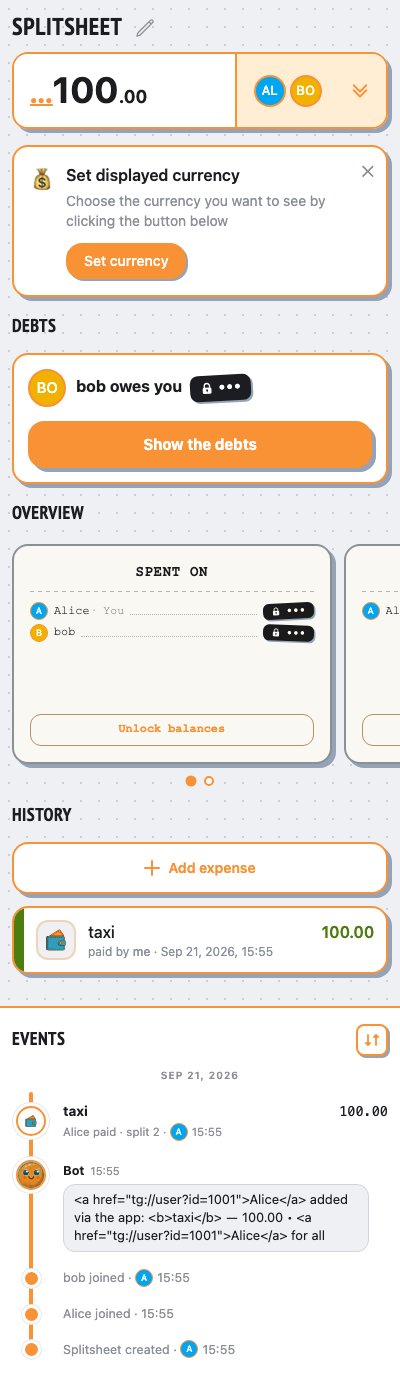
deleted sheet message (dangling reply anchor)
webapp add still succeeds when the sheet message was deleted
👥 People
Alice @alice
sendsAlice runs /newsplit @bob
👥 Group chat
Alice
/newsplit @bob
Hello! I’m @splitsheetbot, here to help you split bills with friends. — show full message
Hello! I’m @splitsheetbot, here to help you split bills with friends.
I use something called a Splitsheet—a dynamic message that keeps track of all expenses and debts. Below, you’ll find your first Splitsheet.
Here’s how to get started:
1. Join the Splitsheet by clicking the 👥➕ button (or reply with add @username)
2. Reply to the Splitsheet with a description of your expense
3. Pin the Splitsheet for quick access
Examples of messages:
- groceries 50 (sender paid, and the cost is split evenly among all members)
- bought coffee for Emma 15 (sender paid, and only Emma owes)
- John bought concert tickets for me and Sarah, 40 each (John spent 80, and both Sarah and you owe)
How to edit expenses:
- Edit your own message
- Reply to your message with the changes
- Reply to your message requesting deletion
Adding expenses is free. One payment shows who owes whom, for the whole group, forever.
When you're ready to start a new Splitsheet, use the /newsplit command. You can mention members to add them immediately: /newsplit @alice @bob
If you have any questions or suggestions, feel free to contact @splitsheet_help_bot
I use something called a Splitsheet—a dynamic message that keeps track of all expenses and debts. Below, you’ll find your first Splitsheet.
Here’s how to get started:
1. Join the Splitsheet by clicking the 👥➕ button (or reply with add @username)
2. Reply to the Splitsheet with a description of your expense
3. Pin the Splitsheet for quick access
Examples of messages:
- groceries 50 (sender paid, and the cost is split evenly among all members)
- bought coffee for Emma 15 (sender paid, and only Emma owes)
- John bought concert tickets for me and Sarah, 40 each (John spent 80, and both Sarah and you owe)
How to edit expenses:
- Edit your own message
- Reply to your message with the changes
- Reply to your message requesting deletion
Adding expenses is free. One payment shows who owes whom, for the whole group, forever.
When you're ready to start a new Splitsheet, use the /newsplit command. You can mention members to add them immediately: /newsplit @alice @bob
If you have any questions or suggestions, feel free to contact @splitsheet_help_bot
🌐
👤➕More ••• ↗
🛡️ Admin log channel
📋 #splitsheet_created
By: Alice
Sheet:
👤 #member_joined
Name: Alice
Sheet:
👤 #member_joined
Name: bob
Sheet:
By: Alice
Sheet:
3d12419a-783f-4ad7-bb82-359b13f8b655👤 #member_joined
Name: Alice
Sheet:
3d12419a-783f-4ad7-bb82-359b13f8b655👤 #member_joined
Name: bob
Sheet:
3d12419a-783f-4ad7-bb82-359b13f8b655givena participant deletes the sheet message, its id still stored
👥 Group chat
Alice
/newsplit @bob
Hello! I’m @splitsheetbot, here to help you split bills with friends. — show full message
Hello! I’m @splitsheetbot, here to help you split bills with friends.
I use something called a Splitsheet—a dynamic message that keeps track of all expenses and debts. Below, you’ll find your first Splitsheet.
Here’s how to get started:
1. Join the Splitsheet by clicking the 👥➕ button (or reply with add @username)
2. Reply to the Splitsheet with a description of your expense
3. Pin the Splitsheet for quick access
Examples of messages:
- groceries 50 (sender paid, and the cost is split evenly among all members)
- bought coffee for Emma 15 (sender paid, and only Emma owes)
- John bought concert tickets for me and Sarah, 40 each (John spent 80, and both Sarah and you owe)
How to edit expenses:
- Edit your own message
- Reply to your message with the changes
- Reply to your message requesting deletion
Adding expenses is free. One payment shows who owes whom, for the whole group, forever.
When you're ready to start a new Splitsheet, use the /newsplit command. You can mention members to add them immediately: /newsplit @alice @bob
If you have any questions or suggestions, feel free to contact @splitsheet_help_bot
I use something called a Splitsheet—a dynamic message that keeps track of all expenses and debts. Below, you’ll find your first Splitsheet.
Here’s how to get started:
1. Join the Splitsheet by clicking the 👥➕ button (or reply with add @username)
2. Reply to the Splitsheet with a description of your expense
3. Pin the Splitsheet for quick access
Examples of messages:
- groceries 50 (sender paid, and the cost is split evenly among all members)
- bought coffee for Emma 15 (sender paid, and only Emma owes)
- John bought concert tickets for me and Sarah, 40 each (John spent 80, and both Sarah and you owe)
How to edit expenses:
- Edit your own message
- Reply to your message with the changes
- Reply to your message requesting deletion
Adding expenses is free. One payment shows who owes whom, for the whole group, forever.
When you're ready to start a new Splitsheet, use the /newsplit command. You can mention members to add them immediately: /newsplit @alice @bob
If you have any questions or suggestions, feel free to contact @splitsheet_help_bot
🌐
👤➕More ••• ↗
viaWebApp.addExpenseAlice adds an expense (taxi, 100)
- ✓the expense was added despite the dead anchor
- ✓the announcement was posted unanchored, not lost
👥 Group chat
Alice
/newsplit @bob
Hello! I’m @splitsheetbot, here to help you split bills with friends. — show full message
Hello! I’m @splitsheetbot, here to help you split bills with friends.
I use something called a Splitsheet—a dynamic message that keeps track of all expenses and debts. Below, you’ll find your first Splitsheet.
Here’s how to get started:
1. Join the Splitsheet by clicking the 👥➕ button (or reply with add @username)
2. Reply to the Splitsheet with a description of your expense
3. Pin the Splitsheet for quick access
Examples of messages:
- groceries 50 (sender paid, and the cost is split evenly among all members)
- bought coffee for Emma 15 (sender paid, and only Emma owes)
- John bought concert tickets for me and Sarah, 40 each (John spent 80, and both Sarah and you owe)
How to edit expenses:
- Edit your own message
- Reply to your message with the changes
- Reply to your message requesting deletion
Adding expenses is free. One payment shows who owes whom, for the whole group, forever.
When you're ready to start a new Splitsheet, use the /newsplit command. You can mention members to add them immediately: /newsplit @alice @bob
If you have any questions or suggestions, feel free to contact @splitsheet_help_bot
I use something called a Splitsheet—a dynamic message that keeps track of all expenses and debts. Below, you’ll find your first Splitsheet.
Here’s how to get started:
1. Join the Splitsheet by clicking the 👥➕ button (or reply with add @username)
2. Reply to the Splitsheet with a description of your expense
3. Pin the Splitsheet for quick access
Examples of messages:
- groceries 50 (sender paid, and the cost is split evenly among all members)
- bought coffee for Emma 15 (sender paid, and only Emma owes)
- John bought concert tickets for me and Sarah, 40 each (John spent 80, and both Sarah and you owe)
How to edit expenses:
- Edit your own message
- Reply to your message with the changes
- Reply to your message requesting deletion
Adding expenses is free. One payment shows who owes whom, for the whole group, forever.
When you're ready to start a new Splitsheet, use the /newsplit command. You can mention members to add them immediately: /newsplit @alice @bob
If you have any questions or suggestions, feel free to contact @splitsheet_help_bot
🌐
👤➕More ••• ↗
Alice added via the app:
taxi ― 100.00 • Alice for all
taxi ― 100.00 • Alice for all
📱 Mini App