paywall: webapp unlock route + Stars payment
mints payable links and the Stars payment unlocks the sheet
👥 People
Alice @alice
sendsAlice runs /newsplit @bob
👥 Group chat
Alice
/newsplit @bob
Hello! I’m @splitsheetbot, here to help you split bills with friends. — show full message
Hello! I’m @splitsheetbot, here to help you split bills with friends.
I use something called a Splitsheet—a dynamic message that keeps track of all expenses and debts. Below, you’ll find your first Splitsheet.
Here’s how to get started:
1. Join the Splitsheet by clicking the 👥➕ button (or reply with add @username)
2. Reply to the Splitsheet with a description of your expense
3. Pin the Splitsheet for quick access
Examples of messages:
- groceries 50 (sender paid, and the cost is split evenly among all members)
- bought coffee for Emma 15 (sender paid, and only Emma owes)
- John bought concert tickets for me and Sarah, 40 each (John spent 80, and both Sarah and you owe)
How to edit expenses:
- Edit your own message
- Reply to your message with the changes
- Reply to your message requesting deletion
Adding expenses is free. One payment shows who owes whom, for the whole group, forever.
When you're ready to start a new Splitsheet, use the /newsplit command. You can mention members to add them immediately: /newsplit @alice @bob
If you have any questions or suggestions, feel free to contact @splitsheet_help_bot
I use something called a Splitsheet—a dynamic message that keeps track of all expenses and debts. Below, you’ll find your first Splitsheet.
Here’s how to get started:
1. Join the Splitsheet by clicking the 👥➕ button (or reply with add @username)
2. Reply to the Splitsheet with a description of your expense
3. Pin the Splitsheet for quick access
Examples of messages:
- groceries 50 (sender paid, and the cost is split evenly among all members)
- bought coffee for Emma 15 (sender paid, and only Emma owes)
- John bought concert tickets for me and Sarah, 40 each (John spent 80, and both Sarah and you owe)
How to edit expenses:
- Edit your own message
- Reply to your message with the changes
- Reply to your message requesting deletion
Adding expenses is free. One payment shows who owes whom, for the whole group, forever.
When you're ready to start a new Splitsheet, use the /newsplit command. You can mention members to add them immediately: /newsplit @alice @bob
If you have any questions or suggestions, feel free to contact @splitsheet_help_bot
🌐
👤➕More ••• ↗
🛡️ Admin log channel
📋 #splitsheet_created
By: Alice
Sheet:
👤 #member_joined
Name: Alice
Sheet:
👤 #member_joined
Name: bob
Sheet:
By: Alice
Sheet:
a5728b9d-faa6-4b2e-a7c4-8336a2a728a0👤 #member_joined
Name: Alice
Sheet:
a5728b9d-faa6-4b2e-a7c4-8336a2a728a0👤 #member_joined
Name: bob
Sheet:
a5728b9d-faa6-4b2e-a7c4-8336a2a728a0repliesAlice replies to the splitsheet: “dinner 100”
- ✓the sheet starts locked
- ✓the response lists the available payment methods
👥 Group chat
Alice
/newsplit @bob
Hello! I’m @splitsheetbot, here to help you split bills with friends. — show full message
Hello! I’m @splitsheetbot, here to help you split bills with friends.
I use something called a Splitsheet—a dynamic message that keeps track of all expenses and debts. Below, you’ll find your first Splitsheet.
Here’s how to get started:
1. Join the Splitsheet by clicking the 👥➕ button (or reply with add @username)
2. Reply to the Splitsheet with a description of your expense
3. Pin the Splitsheet for quick access
Examples of messages:
- groceries 50 (sender paid, and the cost is split evenly among all members)
- bought coffee for Emma 15 (sender paid, and only Emma owes)
- John bought concert tickets for me and Sarah, 40 each (John spent 80, and both Sarah and you owe)
How to edit expenses:
- Edit your own message
- Reply to your message with the changes
- Reply to your message requesting deletion
Adding expenses is free. One payment shows who owes whom, for the whole group, forever.
When you're ready to start a new Splitsheet, use the /newsplit command. You can mention members to add them immediately: /newsplit @alice @bob
If you have any questions or suggestions, feel free to contact @splitsheet_help_bot
I use something called a Splitsheet—a dynamic message that keeps track of all expenses and debts. Below, you’ll find your first Splitsheet.
Here’s how to get started:
1. Join the Splitsheet by clicking the 👥➕ button (or reply with add @username)
2. Reply to the Splitsheet with a description of your expense
3. Pin the Splitsheet for quick access
Examples of messages:
- groceries 50 (sender paid, and the cost is split evenly among all members)
- bought coffee for Emma 15 (sender paid, and only Emma owes)
- John bought concert tickets for me and Sarah, 40 each (John spent 80, and both Sarah and you owe)
How to edit expenses:
- Edit your own message
- Reply to your message with the changes
- Reply to your message requesting deletion
Adding expenses is free. One payment shows who owes whom, for the whole group, forever.
When you're ready to start a new Splitsheet, use the /newsplit command. You can mention members to add them immediately: /newsplit @alice @bob
If you have any questions or suggestions, feel free to contact @splitsheet_help_bot
🌐
📋 Splitsheet
💰 100.00 • 👥 Alice, @bob
Sep 21, 2026
100 — Alice pays, split A… ― 100.00 • Alice for all
🔒 All debts are already calculated. Unlock to see them
↩️ Reply to add an expense. Or tap here
💰 100.00 • 👥 Alice, @bob
Sep 21, 2026
100 — Alice pays, split A… ― 100.00 • Alice for all
🔒 All debts are already calculated. Unlock to see them
↩️ Reply to add an expense. Or tap here
👤➕More ••• ↗
🔓 See the debts
Alice
dinner 100
✍️
viaWebApp.unlockAlice taps the stars unlock row (requests its payment link)
- ✓the tapped method mints a Stars invoice link
👥 Group chat
Alice
/newsplit @bob
Hello! I’m @splitsheetbot, here to help you split bills with friends. — show full message
Hello! I’m @splitsheetbot, here to help you split bills with friends.
I use something called a Splitsheet—a dynamic message that keeps track of all expenses and debts. Below, you’ll find your first Splitsheet.
Here’s how to get started:
1. Join the Splitsheet by clicking the 👥➕ button (or reply with add @username)
2. Reply to the Splitsheet with a description of your expense
3. Pin the Splitsheet for quick access
Examples of messages:
- groceries 50 (sender paid, and the cost is split evenly among all members)
- bought coffee for Emma 15 (sender paid, and only Emma owes)
- John bought concert tickets for me and Sarah, 40 each (John spent 80, and both Sarah and you owe)
How to edit expenses:
- Edit your own message
- Reply to your message with the changes
- Reply to your message requesting deletion
Adding expenses is free. One payment shows who owes whom, for the whole group, forever.
When you're ready to start a new Splitsheet, use the /newsplit command. You can mention members to add them immediately: /newsplit @alice @bob
If you have any questions or suggestions, feel free to contact @splitsheet_help_bot
I use something called a Splitsheet—a dynamic message that keeps track of all expenses and debts. Below, you’ll find your first Splitsheet.
Here’s how to get started:
1. Join the Splitsheet by clicking the 👥➕ button (or reply with add @username)
2. Reply to the Splitsheet with a description of your expense
3. Pin the Splitsheet for quick access
Examples of messages:
- groceries 50 (sender paid, and the cost is split evenly among all members)
- bought coffee for Emma 15 (sender paid, and only Emma owes)
- John bought concert tickets for me and Sarah, 40 each (John spent 80, and both Sarah and you owe)
How to edit expenses:
- Edit your own message
- Reply to your message with the changes
- Reply to your message requesting deletion
Adding expenses is free. One payment shows who owes whom, for the whole group, forever.
When you're ready to start a new Splitsheet, use the /newsplit command. You can mention members to add them immediately: /newsplit @alice @bob
If you have any questions or suggestions, feel free to contact @splitsheet_help_bot
🌐
📋 Splitsheet
💰 100.00 • 👥 Alice, @bob
Sep 21, 2026
100 — Alice pays, split A… ― 100.00 • Alice for all
🔒 All debts are already calculated. Unlock to see them
↩️ Reply to add an expense. Or tap here
💰 100.00 • 👥 Alice, @bob
Sep 21, 2026
100 — Alice pays, split A… ― 100.00 • Alice for all
🔒 All debts are already calculated. Unlock to see them
↩️ Reply to add an expense. Or tap here
👤➕More ••• ↗
🔓 See the debts
Alice
dinner 100
✍️
📱 Mini App
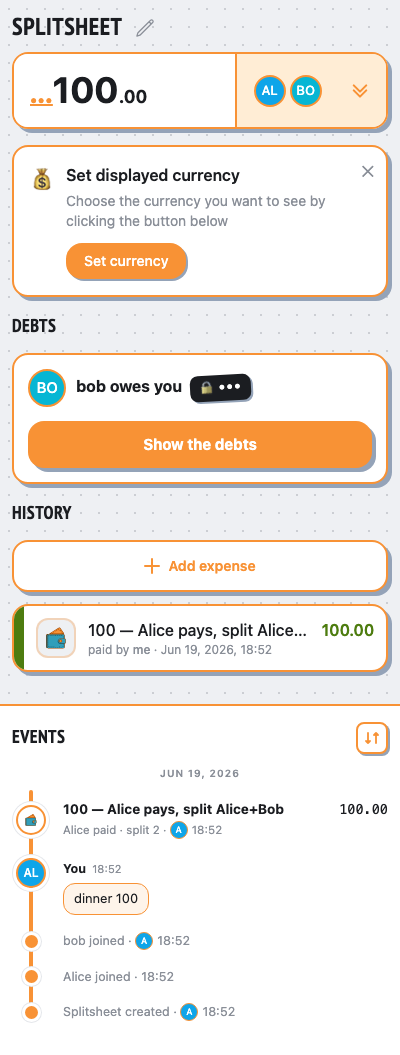
paysInvoiceLinkAlice pays the Stars invoice in the Mini App
- ✓the webapp shows balances unlocked after the payment
- ✓the paid unlock is permanent (premium on)
- ✓the TG message unlocked too — debt lines render
- ✓no 🔓 badge on the stamped sheet — the debts are the receipt
👥 Group chat
Alice
/newsplit @bob
Hello! I’m @splitsheetbot, here to help you split bills with friends. — show full message
Hello! I’m @splitsheetbot, here to help you split bills with friends.
I use something called a Splitsheet—a dynamic message that keeps track of all expenses and debts. Below, you’ll find your first Splitsheet.
Here’s how to get started:
1. Join the Splitsheet by clicking the 👥➕ button (or reply with add @username)
2. Reply to the Splitsheet with a description of your expense
3. Pin the Splitsheet for quick access
Examples of messages:
- groceries 50 (sender paid, and the cost is split evenly among all members)
- bought coffee for Emma 15 (sender paid, and only Emma owes)
- John bought concert tickets for me and Sarah, 40 each (John spent 80, and both Sarah and you owe)
How to edit expenses:
- Edit your own message
- Reply to your message with the changes
- Reply to your message requesting deletion
Adding expenses is free. One payment shows who owes whom, for the whole group, forever.
When you're ready to start a new Splitsheet, use the /newsplit command. You can mention members to add them immediately: /newsplit @alice @bob
If you have any questions or suggestions, feel free to contact @splitsheet_help_bot
I use something called a Splitsheet—a dynamic message that keeps track of all expenses and debts. Below, you’ll find your first Splitsheet.
Here’s how to get started:
1. Join the Splitsheet by clicking the 👥➕ button (or reply with add @username)
2. Reply to the Splitsheet with a description of your expense
3. Pin the Splitsheet for quick access
Examples of messages:
- groceries 50 (sender paid, and the cost is split evenly among all members)
- bought coffee for Emma 15 (sender paid, and only Emma owes)
- John bought concert tickets for me and Sarah, 40 each (John spent 80, and both Sarah and you owe)
How to edit expenses:
- Edit your own message
- Reply to your message with the changes
- Reply to your message requesting deletion
Adding expenses is free. One payment shows who owes whom, for the whole group, forever.
When you're ready to start a new Splitsheet, use the /newsplit command. You can mention members to add them immediately: /newsplit @alice @bob
If you have any questions or suggestions, feel free to contact @splitsheet_help_bot
🌐
📋 Splitsheet
💰 100.00 • 👥 Alice, @bob
Sep 21, 2026
100 — Alice pays, split A… ― 100.00 • Alice for all
💸 Alice ← @bob 50
↩️ Reply to add an expense. Or tap here
💰 100.00 • 👥 Alice, @bob
Sep 21, 2026
100 — Alice pays, split A… ― 100.00 • Alice for all
💸 Alice ← @bob 50
↩️ Reply to add an expense. Or tap here
👤➕More ••• ↗
Alice
dinner 100
✍️
🛡️ Admin log channel
📋 #splitsheet_created
By: Alice
Sheet:
👤 #member_joined
Name: Alice
Sheet:
👤 #member_joined
Name: bob
Sheet:
By: Alice
Sheet:
a5728b9d-faa6-4b2e-a7c4-8336a2a728a0👤 #member_joined
Name: Alice
Sheet:
a5728b9d-faa6-4b2e-a7c4-8336a2a728a0👤 #member_joined
Name: bob
Sheet:
a5728b9d-faa6-4b2e-a7c4-8336a2a728a0⭐ #boost
Days: permanent, Paid: 150 TG:XTR
Charge: charge-6
Sheet:
User: Alice (1001) @alice
Days: permanent, Paid: 150 TG:XTR
Charge: charge-6
Sheet:
a5728b9d-faa6-4b2e-a7c4-8336a2a728a0User: Alice (1001) @alice
📱 Mini App